

When a customer messages you on WhatsApp, then tries your website chat, then rings, it's easy for your team to treat them as three different people. 3CX puts website chat, WhatsApp, Facebook Messenger and text messages in the same app your team already uses for calls.
Chats go into a shared queue for whoever is free, and any website chat can turn into a phone or video call in one click. There's no extra charge per person answering.
Included in
PRO and AI
Charged per agent
No
Where your team answers
The 3CX app
What changes when chat lives in your phone system
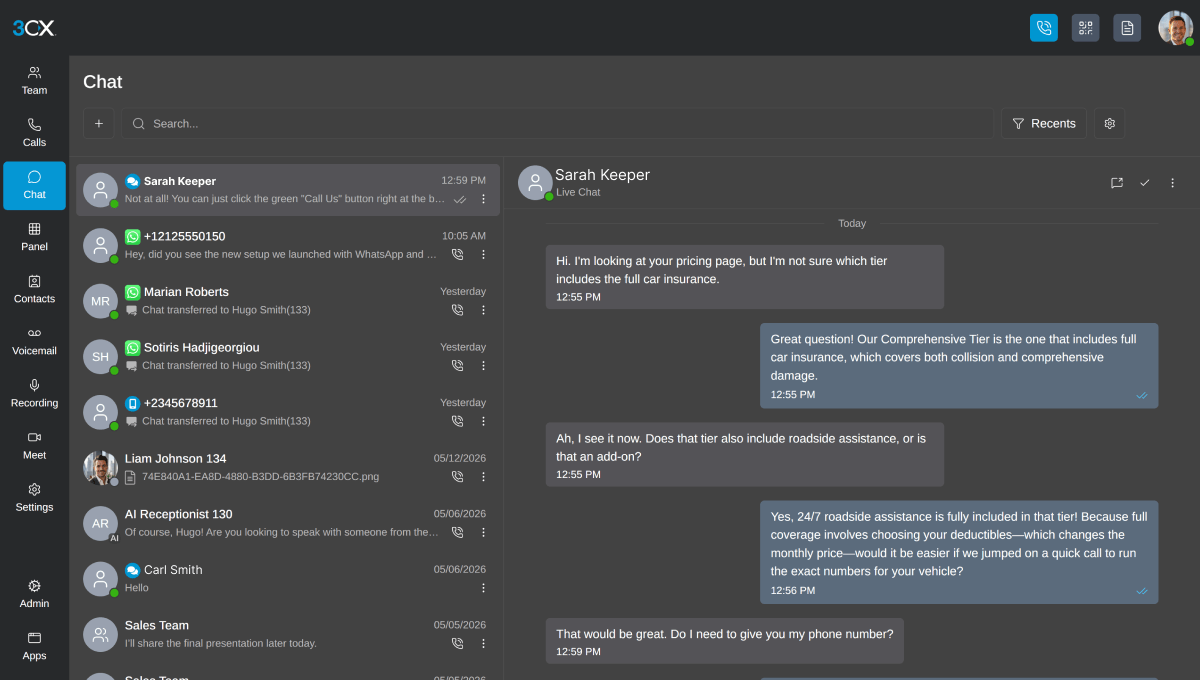
In 3CX, customer chat sits in the same app your team uses for calls, whether that's on Windows, in a web browser or on iPhone and Android. Each conversation has an icon showing where it came from: your website, WhatsApp, Facebook or a text message. Chats with colleagues sit alongside them.
A new chat goes either to a queue (a group of people who share the work) or straight to one person's extension (their own line on the phone system). Everyone in the queue can see it. As soon as someone replies, the chat is theirs and it drops off everyone else's list, so two people never answer the same customer.
Example
You have six people in sales. A WhatsApp message arrives at 10am and all six can see it. Whoever replies first owns the conversation. If the customer then asks about an invoice, they transfer the chat to accounts, who pick it up with the conversation so far in front of them.
Once a conversation is finished, the person handling it marks it as dealt with and it's archived. If the customer gets back in touch before then, their message goes straight back to the same person instead of starting again in the queue. You can also see every past chat and call with that contact, across all your teams.
Turning a website chat into a call
The 3CX live chat box goes on your website as a plugin. It's a one-click install on WordPress, and there are plugins for Wix, Squarespace, Shopify, Joomla, Drupal and Weebly too. You can match it to your brand colours and change the greeting depending on whether your team is in.
When typing isn't getting anywhere, either the visitor or your agent can switch the chat to an audio or video call in the browser. The visitor doesn't dial a number or install anything, and the call arrives in your agent's 3CX app like any other call.
While they're chatting, your team can:
- See the customer's history before replying
- Send quotes, PDFs, spreadsheets and photos straight into the chat
- Use saved replies for the questions you get every day, which managers set up once for the whole team
- Check chat reports for response times and how customers rated the conversation
What WhatsApp and text messages need before they work
WhatsApp needs a WhatsApp Business Platform account with its own number. You can't reuse a personal WhatsApp number, and Meta (the company behind WhatsApp) runs the approval, so 3CX is upfront that it can't speed that part up.
Once it's live, WhatsApp messages land in a queue like any other chat, and several people can answer from one business number on their computer or phone. Customers start those conversations. If you want to message a customer first, Meta controls that and each message has to be approved.
Text messages (SMS) depend on your number provider. 3CX can send and receive texts, but only through a provider that supports it with 3CX, so we'd check your numbers before promising it.
Chat queues come with the 3CX PRO and AI editions. The Basic edition leaves queues out, so if chat is part of your plans, it's worth knowing before you choose a licence. We'd rather tell you that now than have you find out after you've bought the wrong one.
Why 3CX is a good alternative to a separate chat tool
A lot of businesses run website chat in one product, keep WhatsApp on a shared mobile in the office and take calls on the phone system. Each has its own login, and nobody has the full picture of what a customer has already been told.
Many chat tools also charge per agent, per month. 3CX licenses the whole phone system by how many calls can happen at the same time, and chat comes with it, with no per-agent fee. If 12 people in your business answer the odd chat, you aren't paying for 12 extra subscriptions on top of your phones.
There's less for your team to learn, too. They already answer calls in the 3CX app, so chat turns up somewhere they know, and the latest mobile apps let them manage queues away from their desks. There's more on that in what the new 3CX Android app does.
It won't suit everyone. If you run a large messaging team with heavy automation, a specialist platform may do more for you. For most businesses that want customers to reach them on whichever channel they prefer, 3CX covers it inside a system you're already paying for. If calls are your bigger worry, we've also written about how 3CX handles your calls when the phones get busy.

Talk to us about chat on 3CX
If you'd like to see how website chat and WhatsApp would work for your team, we can show you on a free consultation and tell you honestly whether it's worth switching on.